
R SERIES / W COLLECTION
R-W000
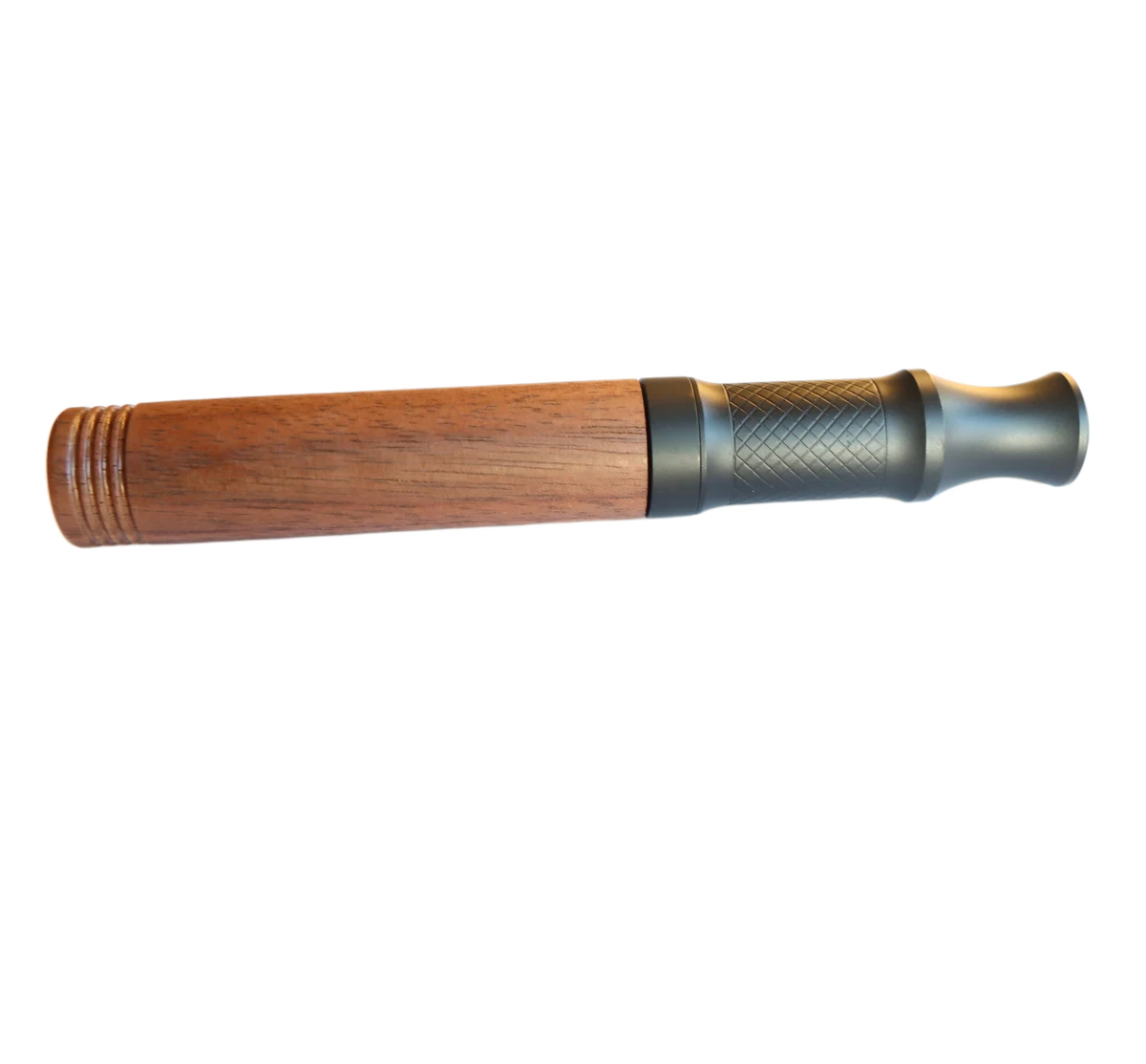
R-W000 horizontal profile view
A full-length view of the in-production R-W000, showing its wood outer shell, crosshatched surface and dark mouthpiece silhouette.
PRODUCT OVERVIEW
Start with the model, then define the brief.
See the model's overall proportions and the transition between its wood shell and dark section before discussing samples or insert direction.
This R-W000 horizontal profile view keeps the complete silhouette in one frame. Compare its visible proportions with the registered dimensions, then confirm the selected finish, configuration and insert fit against a physical sample. For additional construction views, use the main R-W000 page.
- In-production R SERIES model
- Wood outer shell
- Stainless-steel internal structure
SPECIFICATIONS
Product data at model scope.
Registered model
- Model
- R-W000
- Lifecycle
- IN PRODUCTION
- Dimensions
- 107 mm length / 15 mm maximum diameter
- Net weight
- 59 g
Construction
The photograph shows the wood shell, crosshatched surface and transition to the dark section. Confirm the selected finish and internal configuration before ordering.
- Outer shell
- Wood
- Internal structure
- Stainless steel
CONFIGURATION
Review what belongs to this product path.
R-W000 CORE configuration scope
Bottled-aroma CORE configuration
Exact model fit, formulation and project scope are confirmed during review.
Prepared pre-infused CORE configuration
Exact model fit, formulation and project scope are confirmed during review.
| Review field | Bottled aroma | Pre-infused CORE |
|---|---|---|
| Applicable platform | AIRITU R SERIES | AIRITU R SERIES |
| Exact model fit | Confirmed during project review | Confirmed during project review |
PRODUCT-SPECIFIC SEQUENCE
Keep the workflow attached to the format.
- 01
Separate the mouthpiece from the body.
- 02
Install an aroma core into the mouthpiece or core tube.
- 03
Apply 7–8 drops of the selected aroma formulation, or install the prepared pre-infused CORE.
- 04
Reinsert and seat the mouthpiece, then adjust the airflow opening as needed.
Product presentation
Plan the R-W000 insert direction.
Compare the full-length silhouette and registered dimensions with the proposed insert and presentation concept.
Confirm actual fit, protection, sample contents, artwork, pricing and delivery terms before ordering.PROJECT BRIEF
Define customization and commercial context.
Customization
- Branding and presentation direction can be discussed against the full-length product view.
Packaging
- Insert orientation and outer-packaging options
Commercial review
- MOQ is confirmed in the project quotation.
- Discuss sample scope for the selected project.
- Timing is confirmed for the selected configuration and project.
BUYER QUESTIONS
Questions about R-W000.
What is visible in the R-W000 horizontal profile view?
The image shows the model's full-length proportions, wood-to-dark-section transition, crosshatched surface and flared mouthpiece silhouette in one frame.
What should a buyer confirm before designing an insert?
Start with the registered 107 mm length and 15 mm maximum diameter, then confirm fit and protection with the selected sample, insert and outer pack.
How should this image be used with the angled R-W000 page?
Use this full-length view to assess proportions and presentation. Use the angled and separated-part images on the main model page to prepare questions about construction and configuration.
RELATED PRODUCTS
Continue the comparison.
NEXT STEP
Build a focused R-W000 sample brief.
Share the market, comparison questions and project decisions the sample set needs to support.
Request samples